Alfred Workflow Python Development Intro
Summary
This document is aimed at developers who want to build Alfred Workflows in Python. It explains the mechanics of connecting a Script Filter to Python code and introduces the recommended deployment model using uvx.
Why Python?
Alfred supports any language, but Python is a natural fit for workflow development:
No cold-start overhead — Python is an interpreter; each keystroke runs the script directly without spinning up a VM.
No compilation step — iterate fast during development; ship a normal package for production.
Rich ecosystem — almost any task you want to automate already has a library.
Script Filter’s Language and Script
When you add a Script Filter widget to an Alfred Workflow, you configure two fields: Language and Script. Together they form the shell command Alfred runs every time you type a character.
The recommended approach is one Script Filter → one Python CLI subcommand, invoked through uvx.
Why uvx?
uvx downloads, caches, and runs a pinned PyPI package on demand. There is no virtualenv to maintain, no path hardcoding, and no per-machine setup. Upgrading a workflow is a version bump in PyPI and a one-line change in Alfred.
Configuration:
Language:
/bin/bashScript (production):
~/.local/bin/uvx --from your-package==1.0.0 your-cli subcommand --query '{query}'
Script (local dev, pointing at your venv directly):
~/path/to/your-project/.venv/bin/your-cli subcommand --query '{query}'
Each Script Filter maps to exactly one subcommand.
For example, a search-bookmarks Script Filter would look like:
~/.local/bin/uvx --from afwf==${version} afwf-examples search-bookmarks --query '{query}'
The subcommand receives a structured --query argument and is responsible for computing the result and
printing the Alfred JSON to stdout. There is no handler_id, no main.py dispatcher, and no shared
entry point across multiple Script Filters.
Script Filter’s Configuration
After creating a Script Filter widget in Alfred, configure the settings panel as follows:
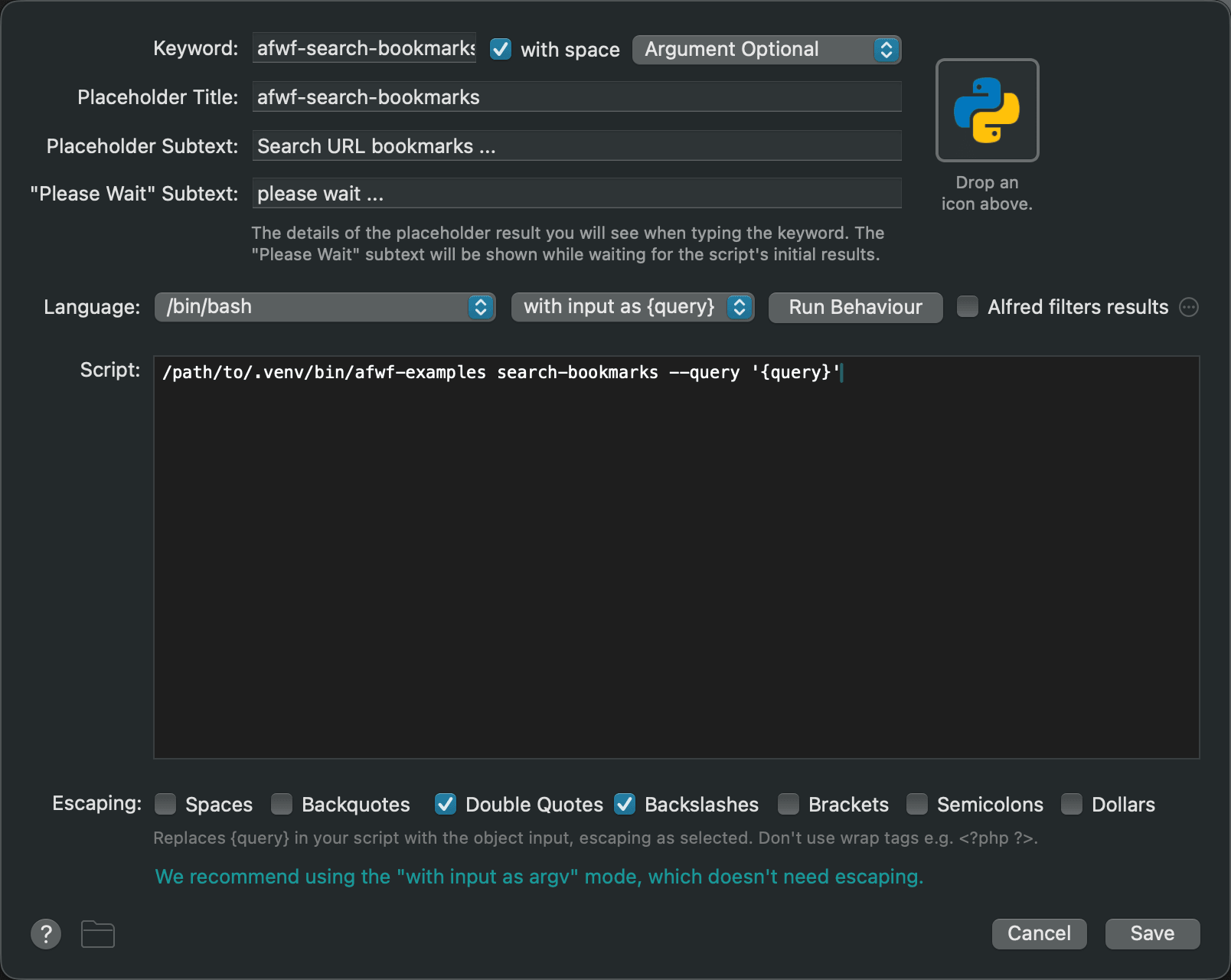
- Keyword
The keyword the user types to trigger this workflow.
- with space
Check this, unless your workflow requires no query.
- Argument Required / Argument Optional / No Argument
No Argument— workflow needs no query.Argument Required— query is mandatory.Argument Optional— query is optional (most common case).
- Language
Select
/bin/bash. We always wrap the call in bash so we can specify the full path touvx.- with input as argv / {query}
Select
with input as {query}. The{query}placeholder is substituted by Alfred and passed as the value of--query. This keeps query parsing inside Python where it can be unit-tested.
Run behavior
Queue mode:
Terminate previous script— when the user types a new character, the previous invocation is no longer relevant, so kill it immediately.Query delay:
Immediately after each character typedworks well for fast commands. CheckAlways run immediately for first typed arg character.Argument: Check
Automatically trim irrelevant arg whitespaces.
- Alfred filters results
Leave unchecked. Let your Python code handle filtering and ranking; this gives you full control over fuzzy matching, custom sort orders, and result freshness.
- Escaping
Check only
Double QuotesandBackslashes.- Script
Sending Items to Alfred
Every Script Filter subcommand follows the same output contract: compute a list of items, serialize them to the Alfred JSON format, and write the result to stdout.
The minimal shape Alfred expects is:
{
    "items": [
        {"title": "item 1"},
        {"title": "item 2"}
    ]
}
In plain Python, that is two lines:
import sys
import json

script_filter_output = {
    "items": [
        {"title": "item 1"},
        {"title": "item 2"},
    ]
}

json.dump(script_filter_output, sys.stdout)
sys.stdout.flush()
In practice you will never write this by hand — afwf provides typed classes
(Item, ScriptFilter) and a
send_feedback() method that handles serialization and flushing for you.
What’s Next?
You now understand how a Script Filter connects to Python code and how the uvx deployment
model works. The next document walks through the afwf framework — the typed classes and
helpers that eliminate the boilerplate shown above.